
5 min read
Through the Integration of Postiz + SocialCrabs + Signal CLI
I used to manage my social media with Hootsuite (199 USD/month), then I found a cheaper alternative — Hookle (47 USD/year). With the rise of the decentralized network Nostr, I wanted to send my posts to Nostr as well. Unfortunately, neither Hootsuite nor Hookle supported this and still don’t. Hookle doesn’t even have an API I could use to access it.
A few days ago, however, I stumbled upon Postiz, an open-source tool for managing literally all social networks. It’s a sophisticated tool with its own analytics, media management, and integration with every possible social network (including Nostr). I asked my Claude to set it up completely in Docker, which it did in a matter of minutes.
To access your social networks outside of licensed third parties (like Hootsuite), which pay enormous sums to social networks for that privilege, you need to create your own apps within each social network and then integrate them into Postiz. It’s not exactly simple, but it’s not complicated either.
1 Facebook
- Create a Facebook App at developers.facebook.com
- Choose app type: Business
- Add the product Facebook Login for Business
- In Settings > Basic, configure:
- App Domains: the domain where your Postiz instance is running
- Privacy Policy URL and Terms of Service URL (required — Claude can generate these for you)
- In Facebook Login > Settings, set:
- Valid OAuth Redirect URIs:
https://your-postiz-domain/integrations/social/facebook
- Valid OAuth Redirect URIs:
- In App Review > Permissions, request approval for the following permissions:
OAuth scopes (v20.0):
pages_show_list,business_management,pages_manage_posts,pages_manage_engagement,pages_read_engagement,read_insights - Add to your server’s
.env:FACEBOOK_APP_ID=<app-id> FACEBOOK_APP_SECRET=<app-secret>
- Keep the app in developer mode — otherwise Facebook will require you to fill out numerous forms.
- Add the Facebook social network to your Postiz (via its web interface) — you can add multiple Facebook groups where you’re listed as admin.
2 Instagram
- Use the same Facebook App as in section 1
- Your Instagram account must be a Business or Creator account
- Instagram must be linked to a Facebook Page
- In the Facebook App, add the product Instagram Graph API
- In App Review, request approval for Instagram permissions (not required if you have the developer version of the app)
- Add another OAuth Redirect URI to the app:
https://your-postiz-domain/integrations/social/instagram - Environment variables are the same as for Facebook (
FACEBOOK_APP_ID,FACEBOOK_APP_SECRET) - Add the Instagram social network to your Postiz (via its web interface).
3 LinkedIn
- Create an app at linkedin.com/developers
- In Products, add:
- Share on LinkedIn (for posting from your personal profile)
- Sign In with LinkedIn using OpenID Connect
- For LinkedIn pages: Marketing Developer Platform (posting to LinkedIn company pages via API requires LinkedIn approval — you can hack around this with SocialCrabs, see below)
You need the following permissions — for personal LinkedIn profile, OAuth scopes:
openid,profile,w_member_social
For LinkedIn Page (Organization) OAuth scopes:
openid,profile,w_member_social,r_basicprofile,rw_organization_admin,w_organization_social,r_organization_social - In the Auth tab, set:
- Redirect URLs:
https://your-postiz-domain/integrations/social/linkedin
- Redirect URLs:
- Add to
.env:LINKEDIN_CLIENT_ID=<client-id> LINKEDIN_CLIENT_SECRET=<client-secret>
- Add the LinkedIn social network to your Postiz (via its web interface).
4 X (Twitter)
- Create a project and app at developer.x.com
- You need to pay for at least the Basic tier for API access at 200 USD/month (this can be hacked around with SocialCrabs, see below)
- In User Authentication Settings:
- App permissions: Read and write
- Type of App: Web App
- Callback URL:
https://your-postiz-domain/integrations/social/x - Website URL:
https://your-postiz-domain
- Generate API Key and API Secret (OAuth 1.0a Consumer Keys)
- Add to
.env:X_API_KEY=<api-key> X_API_SECRET=<api-secret>
X is unfortunately uncompromising — if you want API access with posting capability, you must pay X.com at least 200 USD/month. This is why all alternative iOS/Android X apps stopped working.
Fortunately, there’s a solution — it’s called SocialCrabs, an open-source tool that effectively emulates human browser interaction with social networks. From a technical perspective, it looks as if a real person is clicking (instead of API access, it uses session cookies in the browser). X.com therefore cannot distinguish it from an automated bot and thinks it’s a human. And since the X.com API is not used in this case, there’s no need to pay for it. SocialCrabs can similarly post to social networks like Instagram and LinkedIn without using their APIs, allowing you to bypass LinkedIn’s API bureaucracy when posting to company pages.
Claude will handle the entire SocialCrabs integration into Postiz for you, of course. You just need to review and test it. Postiz needs authentication credentials for each X profile. You obtain these by logging into the X profile in your browser and providing the relevant authentication cookies (F12 in Firefox, then click on Storage) — specifically the auth_token and ct0 cookies. You need to tell Claude to automatically refresh these cookies every 5 days, because they expire after 7 days (otherwise you’d have to manually enter new ones).
5 Nostr
Nostr is natively integrated into Postiz. However, you need to provide your private nsec key (you can create one specifically for posting to Nostr via Postiz).
6 Signal Bot Integration
In my case, I created 3 social network groups:
- Personal (my X, Facebook, LinkedIn, Nostr, optionally Instagram for images)
- Nethemba (X, Facebook, LinkedIn, Nostr)
- Liberation Travel (X, Facebook, Nostr)
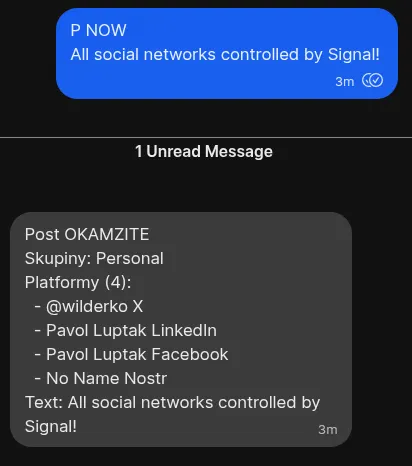
I simply send a message to the Signal bot (which runs via Signal CLI), where the first line specifies which social networks I want to use — for example, P+N means Personal and Nethemba, P+L means Personal and Liberation Travel.
The optional keyword NOW means I want to send it immediately — otherwise it gets scheduled and sent at the next opportunity.
The text on the next line is the actual post.
If the Signal message contains an image, then in addition to the specified social networks, the image is also sent to my Instagram.
Examples of my “posting” Signal messages:
P+N
Post text
(scheduled post to Personal + Nethemba, 6 platforms)
P NOW
Urgent message
(immediate post to Personal only, 4 platforms)
P+N+L
Text + image
(scheduled post to all groups + Instagram, 13 platforms)
My Signal Bot can also do post-processing — grammar error checking (via the Grammarly API), improving the quality of sent text, or optionally generating images for posts.
I can see the complete analytics for all posts through my Postiz platform.
Conclusion
There is no faster and more efficient way to schedule and send messages to all social networks than through Signal (or another messenger). There’s no need to open any browser, no clicking around — everything is fast and instant.
Besides finally being Nostr-positive (!), I also saved money because the whole setup is completely free.
If you actively use Signal and post to social networks, I highly recommend this solution.